
Code mode
Run Claude Code and Codex in parallel.
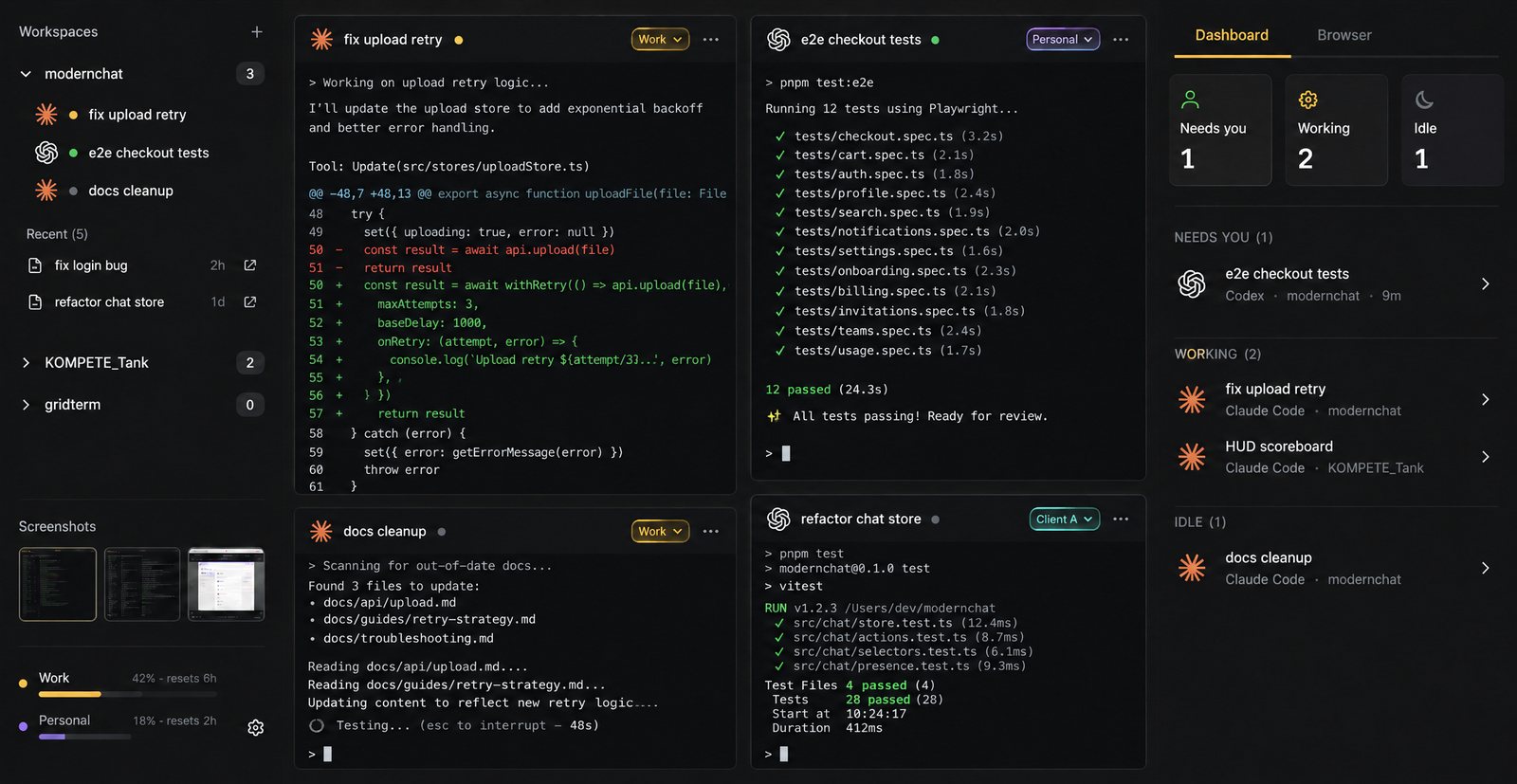
Status
Know which agent needs you.
Each pane reports its state. Red needs you: a question, an approval or a crash. Amber is working, green is finished and not yet looked at, gray is idle.
The Dashboard lists the ones waiting on you first, across every window. One click jumps there, and a notification pings you when you’re in another app.
 Flex Hydra · now
e2e checkout tests
Needs your input
The grid
The real CLIs, side by side.
Every pane runs the agent’s own command-line tool, the same one you’d start in a terminal, in a grid you split and resize. Your hooks, skills and MCP servers work as they always do, and quitting an agent leaves a working shell.
Mix them freely: Claude Code on the backend, Codex on the tests, a shell for the dev server.
- Claude Code
- Codex
- Grok Build
- Gemini CLI
- Cursor Agent
- any shell
Workspaces
A workspace is a project’s folders, one agent each, laid out as a grid, side by side or stacked. Open it and the whole setup starts.
Worktrees for Claude Code
Start a Claude Code pane in its own git worktree, so two agents can change the same repo without sharing a checkout.
Pick up where you left off
Reopen a workspace and every pane relaunches and resumes its conversation (Claude Code, Codex, Grok Build).
Recent chats
Past Claude Code and Codex chats for each folder, read from the agents’ own transcripts, including chats started outside Flex Hydra.
One palette for everything
Ctrl/Cmd+Shift+P finds any pane, chat, workspace or action.
Show the agent what it built
Dock a browser beside the grid for your dev server, then screenshot it into the pane you pick.
Is it a real terminal or a wrapper?
A real terminal. Each pane runs the agent’s own command-line tool in a shell on your machine, so it behaves as it does in your usual terminal, with your settings, hooks, skills and MCP servers.
Which agents can I run?
Claude Code, Codex, Grok Build, Gemini CLI and Cursor Agent, or any shell. Flex Hydra finds the ones installed on your computer.
Can two agents work on the same repo?
Yes. Give each one its own folder in the workspace (a worktree or another checkout), or turn on Worktree when you start a Claude Code pane and it runs in a git worktree of its own.
How do I know which agent needs me?
Each pane’s status shows in its header and on the Dashboard: red needs you, amber is working, green is finished and not yet looked at, gray is idle. A notification pings you when one needs you while you’re in another app.
Do I need API keys?
No. The agents run on your own logins, and their usage counts against the plans you already have. Flex Hydra doesn’t sell model access.

Pricing · one plan
Many heads. One will.
$37/ month
$370/ year, save 17%
Up to 3 computers. Windows and macOS.